Dialer, by Buildova
Cold calling from your browser, with the admin done for you.
Dialer runs in your browser, nothing to install. It works your list one call at a time and you are on every call. It plays your opener in your own voice, catches the email address as they say it, books the meeting, and plans tomorrow's follow-ups without you touching a spreadsheet.
Web based. One caller, one list, one screen. Built in Harrogate for UK cold calling.
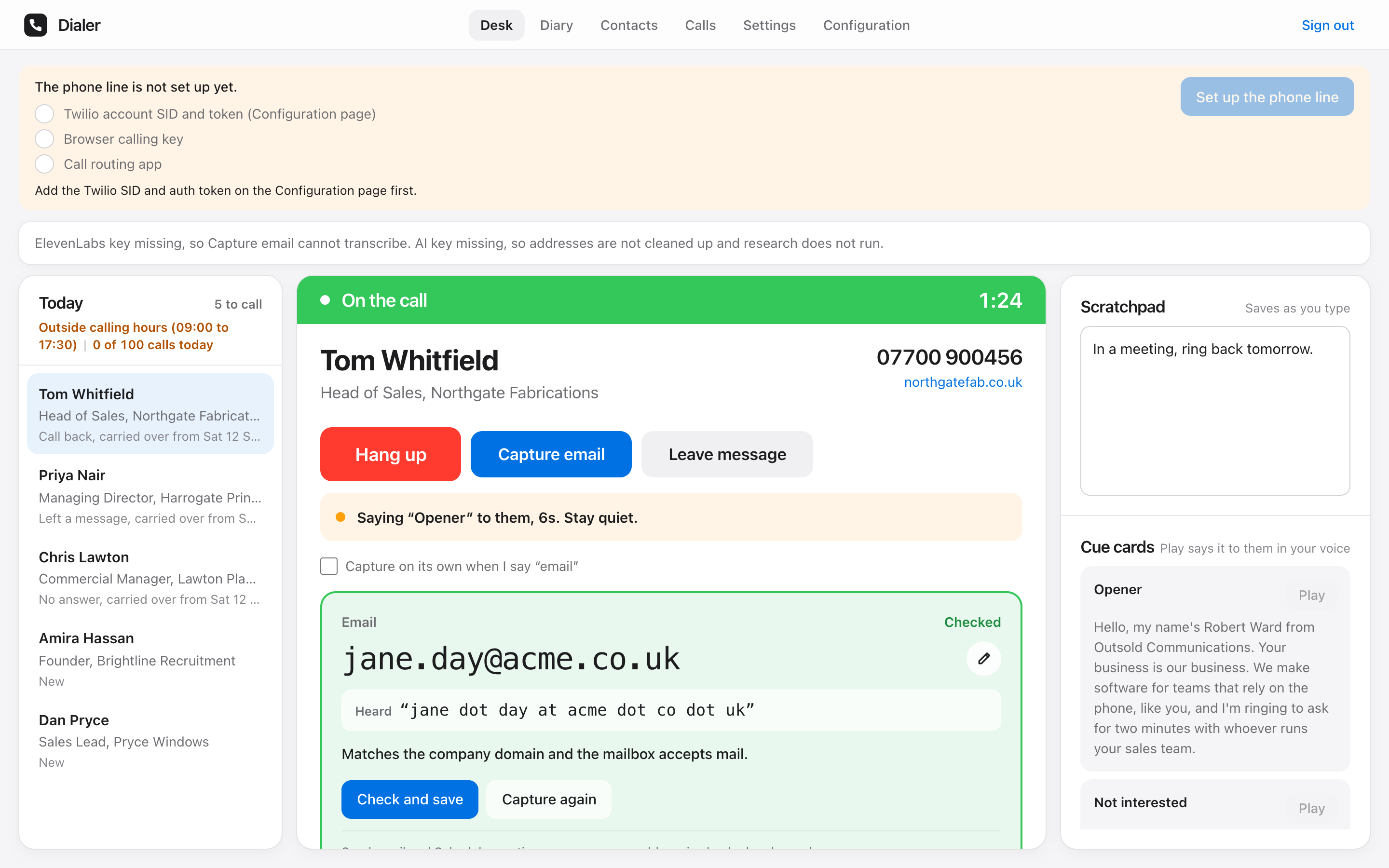
How a call goes
Four presses from dial to done. Everything else happens while you talk.
- 1
Press Call
Your browser is the phone: a headset and a tab, nothing to install. The next contact is already on the card: name, number, job title, company, the notes you kept last time, and how well they fit your ideal client.
- 2
They answer
Press Play opener and your own opener plays to them in your cloned voice while you listen. Take over whenever you like. You are on the line the whole time.
- 3
Ask for the email
Say the word email and Dialer starts listening to their side of the call. It works out the address, checks the domain takes mail, and shows it in big type with the words it heard, so you read it back while they are still there.
- 4
Log the outcome
One press: got email, call back, not interested, no answer, voicemail or wrong number. The notes are saved, the follow-up is booked, and the next contact is on the card.
The part that has to be right
The email address, in big type, while they are still on the line.
You ask for it. Dialer listens to their side only, writes the address, and checks that the domain takes mail and matches their company website. Green means it is right. Amber means check it. Red means it is wrong. The words it heard sit underneath, so you can read the address back and correct a letter before you say goodbye.
Then two buttons: Send email opens the draft, Schedule meeting opens the calendar. Both already know who they are for.
What it takes off your plate
You are on every call
Dialer places one call at a time, and you are the one talking. No silent calls, no abandoned calls, no queue of people picking up to dead air. That is the behaviour the UK rules on automated calling were written to stop.
The address, caught as they say it
Spoken email addresses are the worst thing a transcriber meets. Dialer records only the contact's words, turns jane dot day at acme dot co dot uk into an address, checks the domain has mail and matches the company site, and shows you green, amber or red. You read it back. That loop is what makes it right.
Send the email in one click
Once the address is checked, Send email opens a draft to them in your Gmail with the subject and the first line already written. You finish it while the call is still fresh.
Book the meeting in one click
Schedule meeting opens a Google Calendar event with them as the guest and the Meet link attached. Pick the time, save, done.
Voicemail in your voice
Went to voicemail? Press Leave message at the beep. Your message plays in your cloned voice, the call ends on its own, and the contact is put on tomorrow's list.
Follow-ups run themselves
No answer and voicemail land on tomorrow, tried at a different time of day. Call-backs come up at the time you set. Anything you did not reach rolls forward. After three tries a contact is parked, not lost.
Research before you dial
Give Dialer a sentence about your ideal client. It reads each company's website, scores the fit from 0 to 10 with a one-line reason, and writes three openers you can use or ignore.
Every call logged
Outcome, length, a one-line summary and the recording, so a doubtful address can be listened back to and a good call can be replayed.
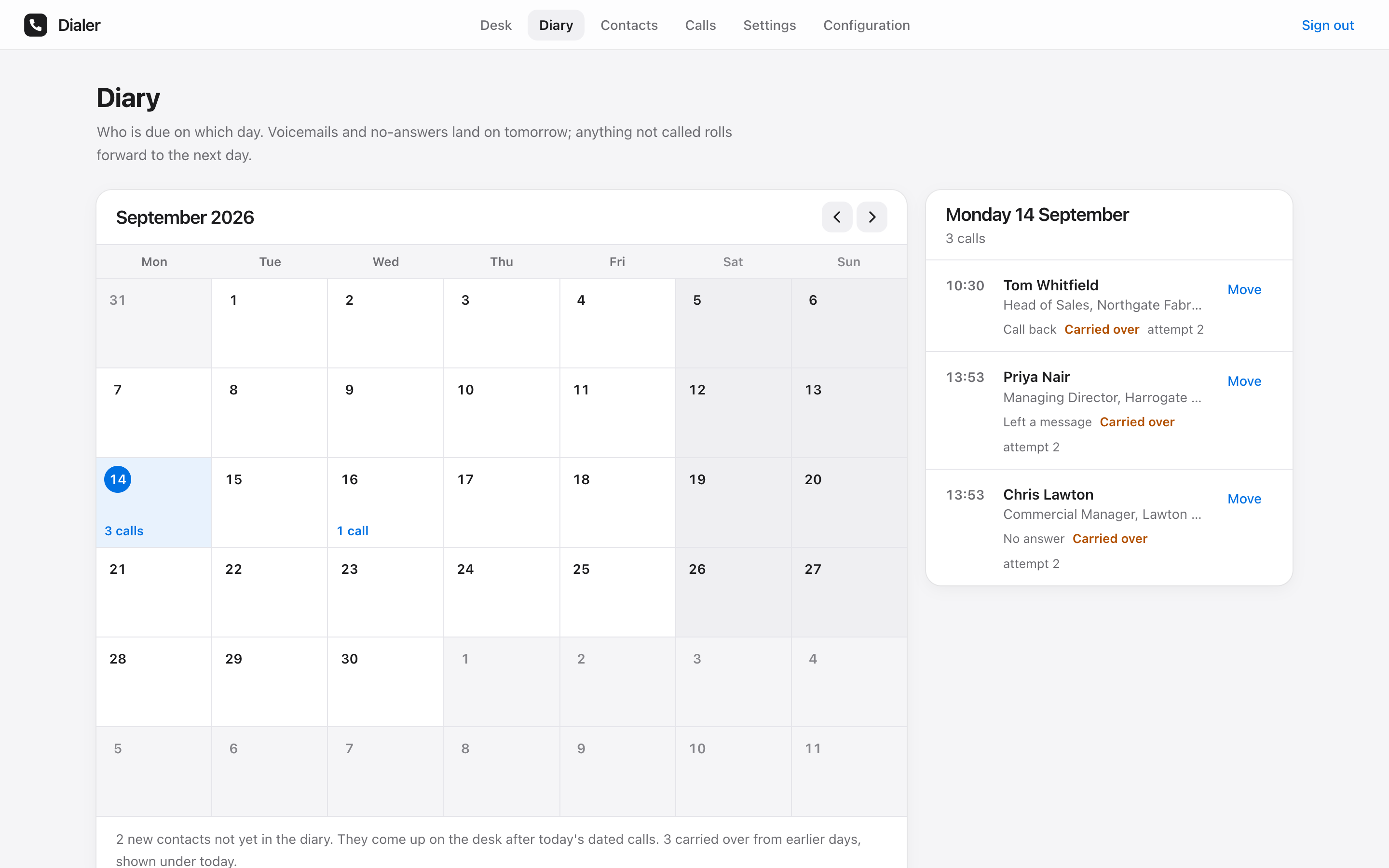
Follow-ups
Tomorrow is already planned when you close the laptop.
Every outcome you log decides where the contact goes next. Voicemails and no-answers land on tomorrow, at a different time of day from the last try. Call-backs come up at the minute you agreed. The people you did not reach roll forward. When you open the desk in the morning the queue is in order: overdue call-backs first, then today's, then the retries, then the best-fit new names.
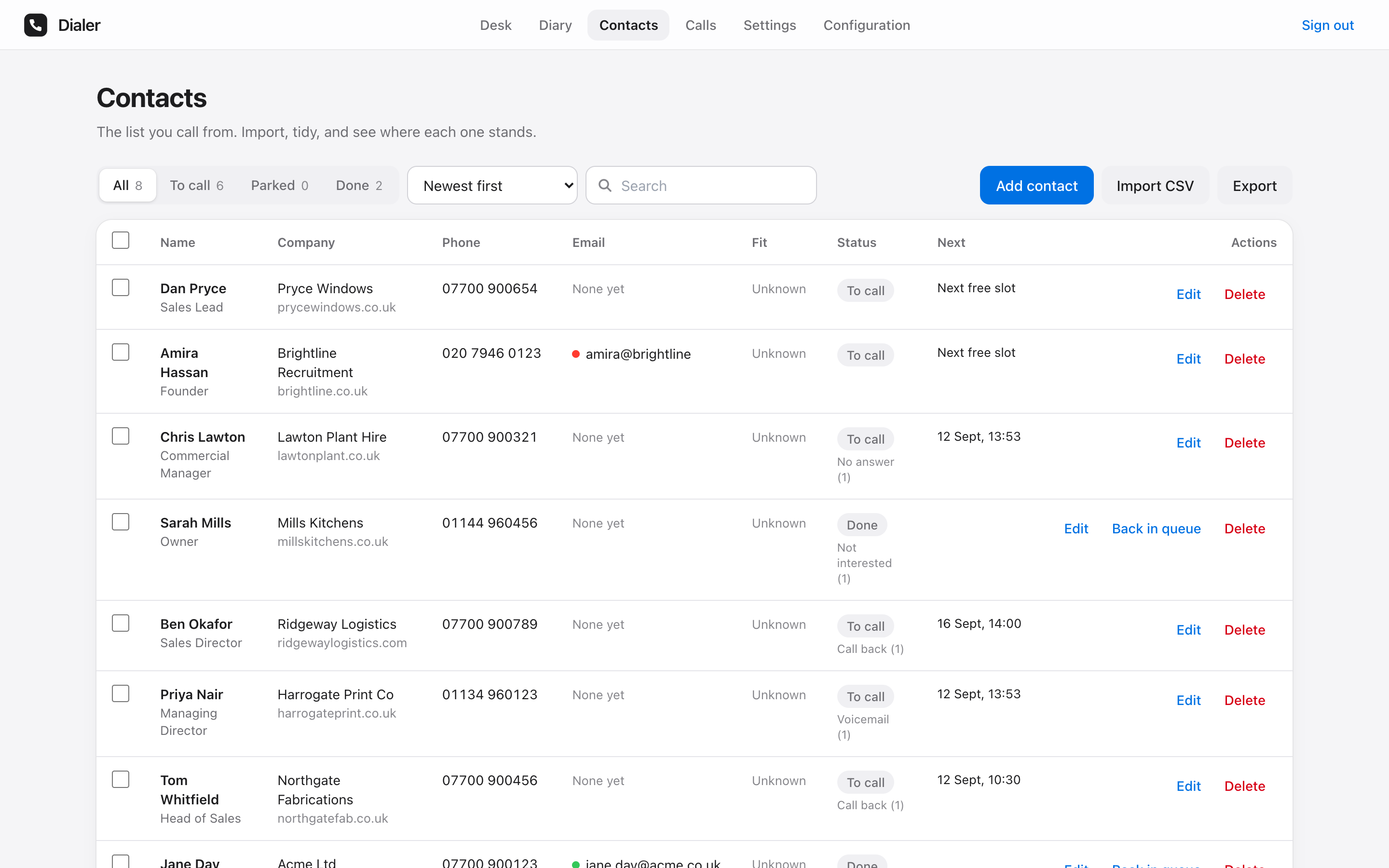
Your list
Import a CSV. Dialer does the rest.
Name, phone, job title, company, website, notes, in any order. A number already on the list is merged, not doubled. Research runs in the background and scores every company against your ideal client before you dial. Search, edit, park, requeue and export from one table.
Before you go live
Burn some dummy calls first.
Ten calls to yourself
Put your own mobile, a colleague and a friend on the list and call them. Get the opener timing right. Ask for the email and watch the capture land. Let one go to voicemail and hear your message drop at the beep. Do it ten times before a real prospect hears you. The desk feels different once your hands know where the buttons are.
Then sharpen the conversation
The Cold Call Simulator is an AI prospect that answers, objects, stalls and hangs up, and scores you afterwards. Run your opener against it until the objections stop surprising you. Your first real call should not be your first call.
Open the Cold Call SimulatorWhat it needs
Three keys, pasted once. Your calls, your accounts, your data.
- A Twilio number
The line your calls go out on, and the caller ID your contacts see. - An ElevenLabs key
Your cloned voice for the opener and the voicemail, and the transcription behind the email capture. - An AI key
Turns spoken words into an address and scores each company against your ideal client.